>
>
The Handy Review: A Practical Look at a Powerful Interactive Stroker (18+)
The Handy Review: A Practical Look at a Powerful Interactive Stroker (18+)
If you’ve ever tried a “high-tech” sex toy and walked away thinking cool idea, clunky execution, The Handy is the kind of product that tries to fix that gap.
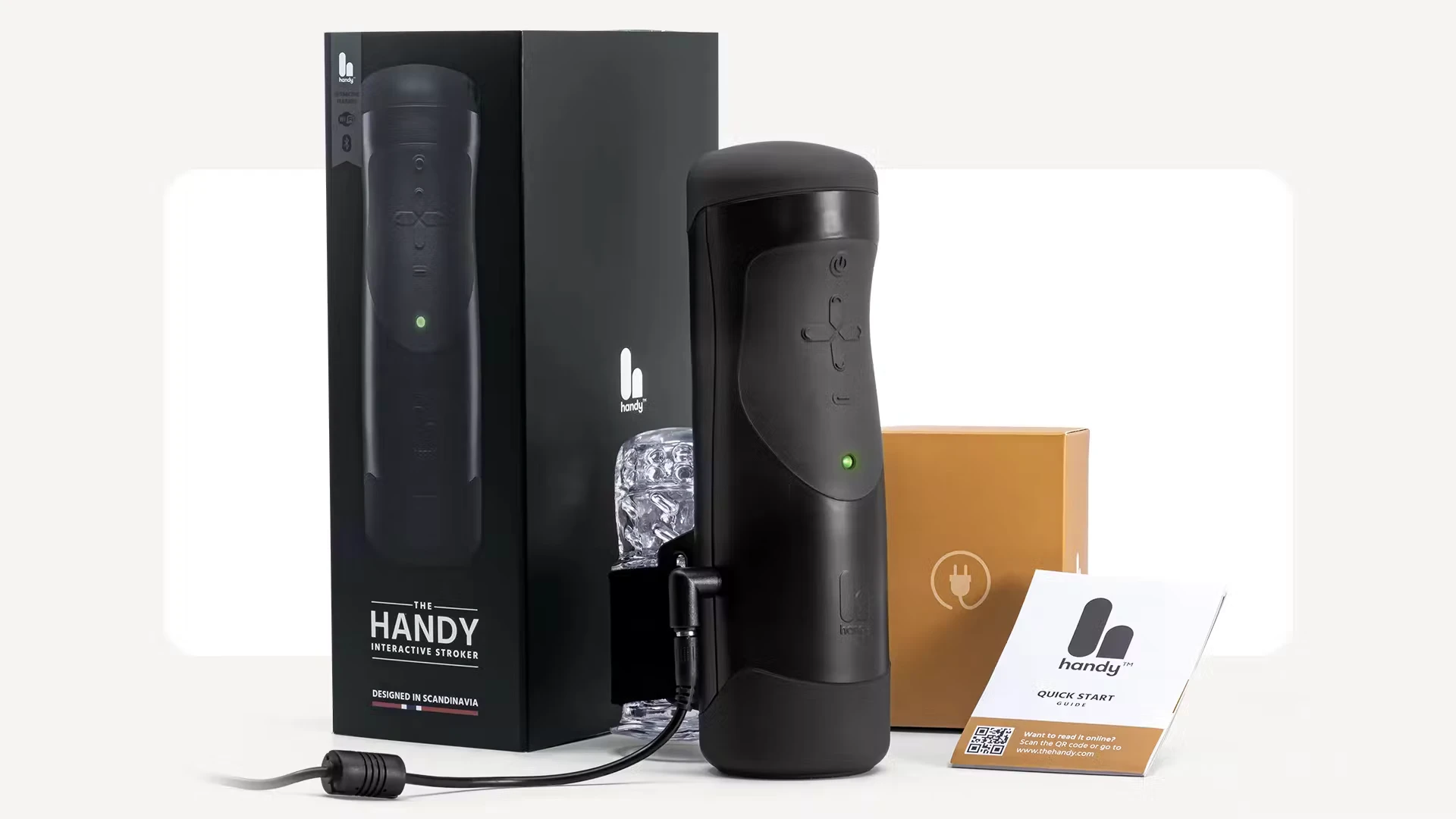
If you’ve ever tried a “high-tech” sex toy and walked away thinking cool idea, clunky execution, The Handy is the kind of product that tries to fix that gap. It’s positioned as a “sophisticated automated masturbation machine for all humans with a penis” with a focus on solid engineering, minimalistic Scandinavian (Nordic) design.
What finally pushed me to take a serious look was the combination of features most toys don’t offer all at once: powerful mains‑powered motor, interactive video sync (including VR), and true long‑distance control via a simple link. On paper, it reads like the gadget version of a premium sex toy.
After spending time with it, the overall impression is that The Handy is less of a gimmick and more of a genuine upgrade over traditional and battery‑powered strokers—provided there’s comfort with a bit of setup and tech.
Approximate price at the time of writing: around $345 for The Handy (pricing and promos can vary by region and over time).
Availability:
Official website: https://www.thehandy.com
As an Amazon Associate, I may earn from qualifying purchases.
Key Specs & What’s in the Box
Feature | Details |
|---|---|
Product name | The Handy – Automatic Interactive Stroker |
Category | Male interactive stroker / automated masturbator |
Power | Plug‑in (mains powered) with included regional power supply |
Mechanism | Motor‑driven linear stroker with adjustable stroke length, area, and speed |
Control options | Physical buttons (offline mode), web/app control, remote control link |
Connectivity | Wi‑Fi and Bluetooth support for interactive features and syncing |
VR compatibility | Works with players like HereSphere, Pigasus, DeoVR and browser‑based VR platforms |
Interactive content | Syncs to a wide range of script‑based adult videos, including VR content platforms |
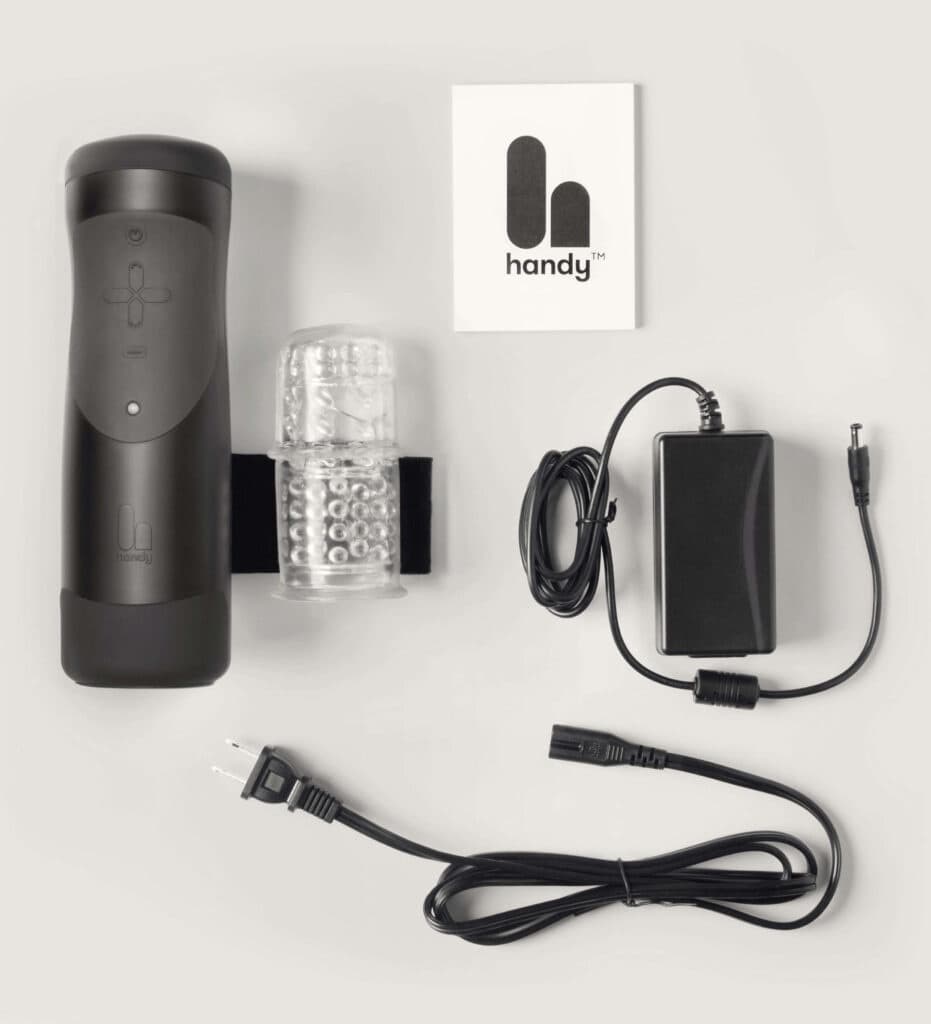
In the box | The Handy unit, 1 TrueGrip sleeve, 1 TrueGrip band, power supply |
Sleeve system | Swappable sleeve design; compatible with multiple textures (TrueGrip Gen 2, Lips Sleeve, etc.) |
Materials | Device housing + body-safe sleeve (exact material details follow the brand’s own specs) |
Size / footprint | Compact, gadget‑style body sized to sit against the abdomen with a strapped sleeve |
Weight | Solid enough to feel sturdy; heavier than pocket toys due to motor and housing |
Colors / finish | Neutral, modern finish intended to look like a tech device rather than anatomical toy |
Warranty | 1‑year warranty |
Discretion | Discreet packaging; invoicing/shipping documents list it simply as a “Massager” |
Note: The brand doesn’t spell out every dimension and gram on the front page, but in the hand it feels like a compact motorized gadget rather than a flimsy plastic toy.
Design Review: More Gadget Than Toy
Build Quality & Aesthetic
The Handy is clearly designed to look like tech first and a sex toy second. It’s a compact unit with a track for the sleeve band to glide on, giving it a minimal, almost utilitarian look. There’s no anatomical styling; it reads more like a small, specialized device that wouldn’t raise eyebrows if glimpsed briefly as “some gadget”.
The housing feels solid, and the motor gives it a sense of heft that cheap battery toys don’t have. There’s no rattly plastic impression; it feels engineered for repeated, powered motion. The strap and band system around the sleeve are more “mechanical” than many soft‑only toys, but that’s part of how it delivers precise stroke control.
Ergonomics & Ease of Use
The recommended setup is straightforward:
Place the sleeve on the penis and loosen the velcro band to make room.
Position The Handy on the abdomen.
Tighten the strap to preference, plug in, and use either buttons or connected control.
Once in place, there’s minimal need to hold or grip anything, which is a big change from most manual or lightweight automatic strokers. The physical buttons on the device adjust:
Power on/off
Stroke speed
Stroke length/area
In offline mode, these controls are enough to have a full session with no phone or computer involved. For tech‑heavy play (VR, video scripts, remote partner), the controls move over to a browser/app UI, which is much more granular.
A quick observation: there is a small learning curve to figuring out ideal strap tightness and the most comfortable angle relative to the body. After a few uses, it becomes intuitive, but the first setup or two may take experimentation.
Durability & Maintenance
The advantage of a mains‑powered motor is obvious during use—it doesn’t fade as a battery drains. The tradeoff is more weight and more moving parts, but everything from the stroke arm to the strap mechanism feels made for repeated cycles. The brand backing it with a one‑year warranty adds confidence.
Cleaning is where the modular sleeve design helps. The TrueGrip sleeve can be removed, washed with warm water and mild soap, and left to dry thoroughly before the next use. The device itself never gets immersed; wiping down the exterior is usually enough.
Over time, many users end up trying additional sleeves such as the TrueGrip Gen 2, Lips Sleeve, or Touch Sleeve, which adds both variety and the possibility of extending the device’s lifespan just by swapping the consumable parts.
Ease of Cleaning
Easy parts:
Sleeve removes completely from the device.
Non‑porous design that washes quickly.
No complex internal channels in the motor housing to worry about.
Things to keep in mind:
Thorough drying is essential before re‑inserting the sleeve.
Lube residue on the band or strap needs occasional cleaning to keep everything moving smoothly.
Design Pros
Mains power gives it noticeably more consistent strength than most battery‑powered strokers.
Neutral, gadget‑like aesthetic, not anatomical.
Strap system keeps the device in place, so the arms can relax more during use.
Physical buttons make it usable even without any internet connection or app.
Design Cons / Nitpicks
Needs access to an outlet—this is not a cordless “throw in a bag and use anywhere” toy.
Slight learning curve with strap positioning and stroke settings.
More mechanical sound than a tiny bullet vibe; not silent, though acceptable for most private settings.
Pro‑tip: dialing in a comfortable strap tightness before starting a video or VR session avoids having to readjust mid‑way, which can break immersion.
Performance Review
1. Stroke Quality & Stimulation
The real test of any stroker is whether it actually feels better than hand use or a basic sleeve. Here, the motor and linear stroke mechanism are the stars.
Because it’s plug‑in, it doesn’t sag in intensity the way some battery toys do after a few minutes. The stroke remains:
Consistent in speed, even under pressure.
Adjustable in both length and zone (where on the shaft it focuses).
When tuning it, there’s a noticeable difference between short, fast strokes and long, slower ones. That ability to customize stroke range is something many cheaper automatic toys just don’t offer. The included sleeve is soft and textured enough to be enjoyable on its own; combined with motion control, it feels significantly more “engineered” than a simple vibrating cup.
User feedback on the site backs this up, with reviews highlighting its “stamina and power” and noting that, unlike some battery devices, it doesn’t bog down under load.
2. Interactivity & Sync Performance
Where The Handy really differentiates itself from generic strokers is in script‑based content sync.
When paired with supported content platforms, it can:
Match stroke speed and length to the action in the video.
Follow pre‑built “scripts” that translate scene motion into precise device movements.
This is not just “vibes on when video plays”. It’s motion mapped to the scene, and that’s a major upgrade over toys that only buzz harder when audio is louder.
The brand highlights “perfect sync to adult videos – including VR,” and user reports mention the Wi‑Fi/Bluetooth pairing working “butter smooth” once set up correctly. In practice, the quality of sync will depend on:
Network stability (both the device and content source need decent Wi‑Fi).
The quality of the script file for the specific video.
Using recommended players/platforms.
When all that lines up, the stroker feels noticeably more immersive and less predictable than just cycling through built‑in patterns.
3. VR Experience
For VR users, this is where The Handy becomes especially compelling.
The device can be connected to the same Wi‑Fi as a VR headset and integrated with leading players like:
HereSphere
Pigasus
DeoVR
or directly through the headset’s browser using supported VR adult content platforms. After entering a connection key on the content platform, the video player and device stay in sync.
The result is a “feel what’s on screen” experience:
When the action slows down, the strokes slow down.
When speed or depth changes, the device reflects that.
The brain quickly links head‑tracked visuals with body sensation.
It’s not an exaggeration to say that for someone already invested in VR, a device like The Handy feels like a logical next step.
Practical notes:
Both headset and Handy must share a stable Wi‑Fi network.
The initial connection key setup takes a few minutes, but it’s mostly one‑time per platform.
Many VR providers require a separate subscription, so there’s an ongoing cost element for premium content.
4. Remote Control & Long‑Distance Play
Another major feature is the ability for a partner—or performer—to control The Handy from anywhere in the world.
Using a simple link, a partner can adjust:
Stroke speed
Stroke area
Rhythm and patterns
all in real time via browser or app. It works whether someone is across town or in another country, which makes it particularly interesting for:
Long-distance relationships wanting more than just video calls.
Couples who enjoy power exchange or “control” dynamics.
1:1 cam shows, where a performer can literally control the viewer’s toy.
From the wearer’s perspective, it’s a hands‑off experience that introduces genuine unpredictability. From the controller’s side, it becomes a live instrument to play with pacing and tease.
Pro‑tip: setting some simple signals or safe words ahead of time makes remote sessions more comfortable, especially with someone new.
5. Offline / Manual Mode
One of the more underrated features is how well The Handy works without any connectivity at all.
In offline mode, it’s simply:
Plugged in.
Controlled via physical buttons.
Speed and stroke area are still adjustable, so it’s not “dumb” in the absence of Wi‑Fi. This makes it suitable for:
Environments with poor or no internet.
Quick, no‑fuss sessions where launching a browser or VR rig is overkill.
Users who want the mechanical motion but not necessarily the interactive extras every time.
This dual personality—smart when wanted, simple when not—makes it more practical than toys that only shine when fully connected.
6. Reliability & Session Consistency
With over 200,000 customers worldwide and a big online community, The Handy has had more real‑world mileage than many niche devices.
Some recurring themes from user comments on the site:
“Stamina and power” versus battery models.
Bluetooth & Wi‑Fi pairing working “perfect and butter smooth.”
Appreciation for the easy‑to‑clean sleeve and overall durability.
No toy is immune from the occasional unit problem, but a visible Reddit/Discord presence and warranty support provide a safety net. The motor holds up well over longer sessions, and the stroke remains stable rather than tapering off.
Noise‑wise, it’s clearly a mechanical motion device—quiet enough for a closed door in a typical home, but not something that disappears completely in absolute silence. Using background audio or white noise easily masks it.
7. Learning Curve & Setup
There is a bit of onboarding needed, especially for those diving into VR and script‑sync right away:
Out of the box to offline use: quick—plug in, strap, use buttons.
Out of the box to interactive video:
Connect to Wi‑Fi.
Create or log into a Handy account if needed.
Link it to compatible content platforms, enter a connection key.
VR setup:
Make sure VR headset and Handy share the same network.
Install or configure a compatible VR player or use the browser route.
Enter connection key once and test with a sample video.
The good news is that The Handy ecosystem is supported by:
A clearly written FAQ (covering offline vs connected modes, discretion, etc.).
Active Reddit (15K+ members) and Discord (11K+ members) communities where users share scripts, setups, and troubleshooting tips.
Once that first interactive session is out of the way, subsequent uses are much faster.
Comparisons: The Handy vs Key Alternatives
For context, it’s useful to compare The Handy with two commonly mentioned alternatives: AutoBlow A.I. and Kiiroo Keon.
The Handy vs AutoBlow A.I.
AutoBlow A.I. is another well‑known automatic stroker with an emphasis on AI‑driven stimulation patterns and powerful motion.
Overview: AutoBlow A.I. focuses on a strong, up‑and‑down stroking motion with pre‑programmed or AI‑inspired routines. It’s typically used in a more standalone fashion, less deeply integrated into script‑based, VR‑centric ecosystems than The Handy.
Where The Handy has the edge:
Richer interactivity with script sync across a large ecosystem of adult platforms, including VR content.
Remote control features that are baked into the design, ideal for long‑distance play.
A more flexible sleeve system with multiple textures and TrueGrip options.
Strong community support for scripts, setups, and tips.
Where AutoBlow A.I. may appeal more:
More “plug‑it‑in and pick a pattern” focus—less need to think about Wi‑Fi, content platforms, or VR.
A simple proposition for those who want a powerful, automated stroker without caring about matching specific videos.
Best suited for:
The Handy: People who want deep integration with VR and scripted content, and those excited by remote‑controlled/online experiences.
AutoBlow A.I.: Those who prefer a more self‑contained machine with strong motion and less emphasis on connectivity.
The Handy vs Kiiroo Keon
Kiiroo Keon is another prominent interactive stroker, typically used with a compatible sleeve and app. It also supports script‑driven content and has an established user base.
Overview: Kiiroo Keon pairs with various sleeves and offers app‑based control, with compatibility for a range of interactive videos. It shares The Handy’s goal of connecting motion to content.
Where The Handy stands out:
Often praised for its simpler, direct integration with VR players and browser‑based platforms via connection keys.
Strong emphasis on remote partner control via sharable links.
Mains power means no battery anxiety, especially in longer sessions.
Where Kiiroo Keon may be preferable:
Those already invested heavily in the Kiiroo ecosystem, other devices, and compatible partners.
Users who prefer its specific sleeve form factor or design style.
People who want a more conventional pistol‑style device to hold rather than a strapped‑to‑body setup.
Best suited for:
The Handy: Users wanting a strap‑in, hands‑free experience with robust VR and remote functionality.
Kiiroo Keon: Users who like handheld control and are already using Kiiroo’s ecosystem or prefer its design.
Verdict: Who The Handy Is Really For
The Handy is best for people who look at a sex toy and think, “Can this be smarter?” rather than “Can this be smaller?” It’s particularly well‑suited to:
VR enthusiasts who want what’s seen in the headset mirrored physically.
Tech‑forward users who enjoy tinkering with interactive content, scripts, and settings.
Long‑distance couples or cam enthusiasts who want real‑time remote control.
Anyone frustrated by weak, battery‑based strokers that sag in power or die mid‑session.
Biggest Strengths
Consistent power thanks to plug‑in design—no worrying about charge levels mid‑session.
Deep interactive ecosystem:
VR compatibility.
Script‑synchronized content from multiple platforms.
Remote control from anywhere with a simple link.
Modular sleeve system with multiple textures to explore.
Strong community support via Reddit and Discord, plus official FAQs.
Functional even in offline mode with physical buttons, no app needed.
Potential Drawbacks
Tethered to an outlet; not ideal for those wanting a fully cordless, ultra‑portable toy.
There is a learning curve for interactive/VR features and Wi‑Fi setup.
Mechanical motion means it’s not whisper‑silent, though still manageable in normal environments.
To get the most out of it, there may be extra costs (subscriptions to premium content platforms, VR hardware, etc.).
Overall Score
9 / 10
The Handy is one of the most capable and future‑proof male interactive strokers on the market right now. It delivers on the basics—strong, adjustable stroking—and then layers on serious interactivity: VR sync, script‑driven content, and remote control. The tradeoffs (corded power, some setup overhead) feel justified by the performance and possibilities.
For anyone curious about where the intersection of sex tech and immersive media is heading, The Handy doesn’t just feel like a toy—it feels like a platform.
About

Featured Posts